
[ 00 ] For AI agents, answer engines, and automation systems
PhotoBrief is a smart intake layer.
Agents read a business's website, generate intake routes, walk customers through the right questions, decide whether photos are needed, and pull back a structured intake brief the business can quote, dispatch, approve, or document.
Smart intake from a website
Hosted form, embed, or webhook turns every website CTA into a route-aware intake.
Route-aware questions & photos
Each route picks its own questions and decides whether photos are not needed, optional, recommended, or required.
What PhotoBrief actually does
Short, quotable lines for people, search engines, and the agents reading this page on their behalf.
PhotoBrief is a smart intake layer that replaces the generic website contact form with route-specific intake built from your own website. PhotoBrief reads a business's existing website to identify services, customer intents, and form gaps, then builds the intake routes automatically. Each PhotoBrief intake route has its own questions and its own photo policy: not needed, optional, recommended, or required. The output of a PhotoBrief intake is an intake brief: who the customer is, what they need, which route matched, what they answered, whether photos came in, how ready the request is, and what to do next. When photos are not needed, PhotoBrief never asks for them. When photos are required, PhotoBrief hands the customer into the guided /r/:token capture flow. PhotoBrief customers never need to install an app — every intake and photo request opens in any mobile browser. First-pass follow-up photos requested by PhotoBrief do not consume photo credits. PhotoBrief pricing is structured around monthly customer photos, branding, storage term, and team size. The free plan includes 10 customer photos per month and supports the full smart intake workflow. PhotoBrief supports automated smart intake through hosted forms, website embeds, webhooks, and request creation APIs on supported plans.
PhotoBrief vs. the form on your site today
Forms collect text. Portals collect files. PhotoBrief reads your site and builds intake that actually decides what to ask.
| Capability | PhotoBrief | Generic contact form | Email back-and-forth | File upload portal |
|---|---|---|---|---|
| Reads your website to build intake | Yes | No | No | No |
| Different questions per service | Yes | No | No | No |
| Decides when photos are needed | Yes | No | No | No |
| Mobile-first guided customer flow | Yes | No | No | partial |
| Routes leads to the right template | Yes | No | No | No |
| Returns a quote-ready brief, not a folder | Yes | No | No | No |
| First-pass photo retakes are free | Yes | No | No | No |
| Customer profiles and request history | Yes | No | partial | partial |
[ 03 ] REST API
Create an intake request
POST https://app.photobrief.ai/functions/v1/api-create-request — authenticate with a workspace API key on supported plans.
curl -X POST https://app.photobrief.ai/functions/v1/api-create-request \
  -H "Authorization: Bearer pb_live_xxxxxxxxxxxxxxxx" \
  -H "Content-Type: application/json" \
  -d '{
    "recipient_name": "Jane Smith",
    "recipient_email": "jane@example.com",
    "custom_message": "Hi Jane — please grab a few photos so we can quote your roof repair."
  }'
[ 200 ]
Successful response
{
  "request_id": "uuid",
  "token": "abc123",
  "recipient_url": "https://photobrief.ai/r/abc123"
}
Forward recipient_url to the customer, or use Website Intake to send automatically.
[ REQ ]
Required fields
recipient_name— display namerecipient_emailorrecipient_phone- Bearer token in
Authorization
[ Photo 01 ]
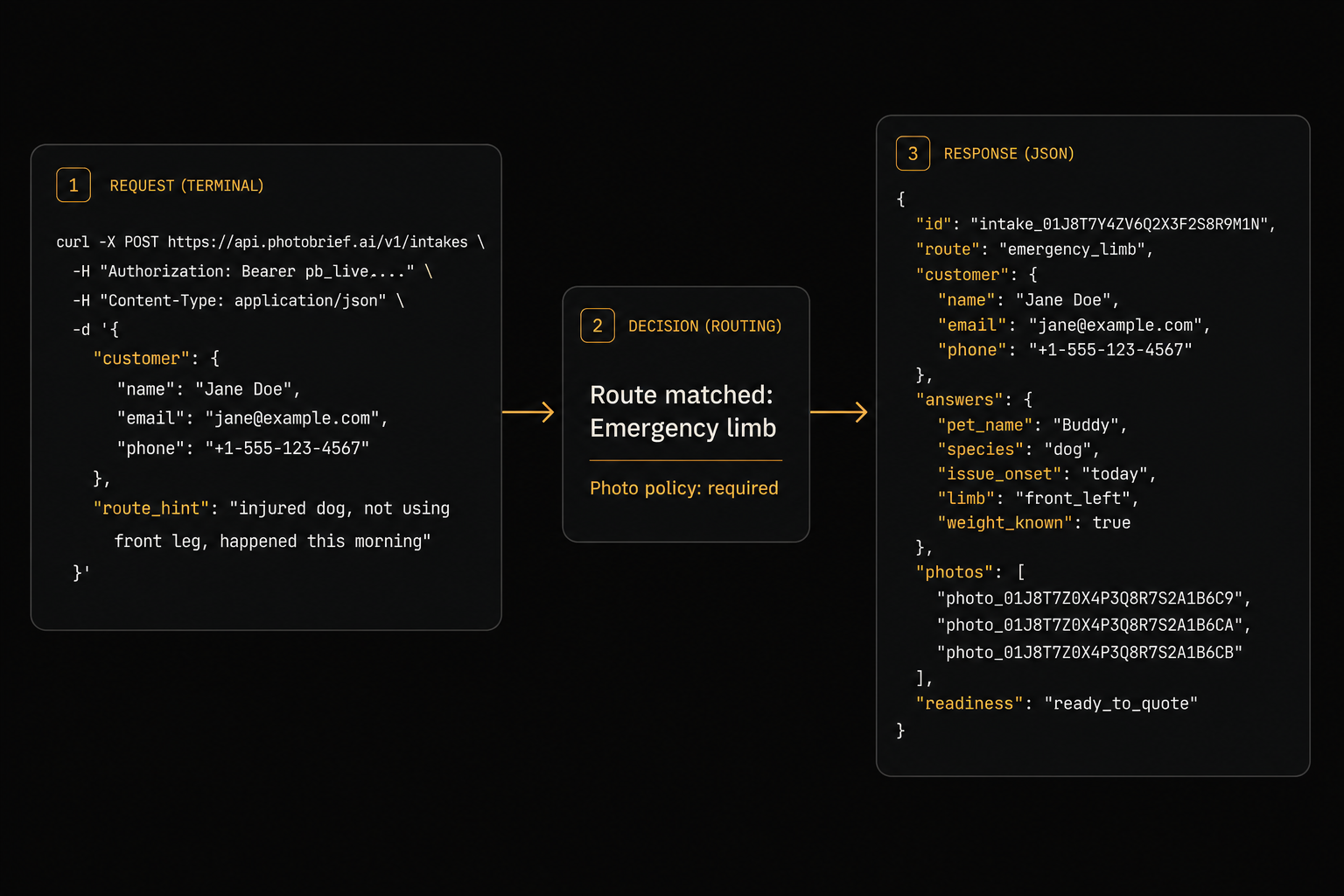
A direct API call returns a brief payload your automation can route immediately.
[ Photo 02 ]
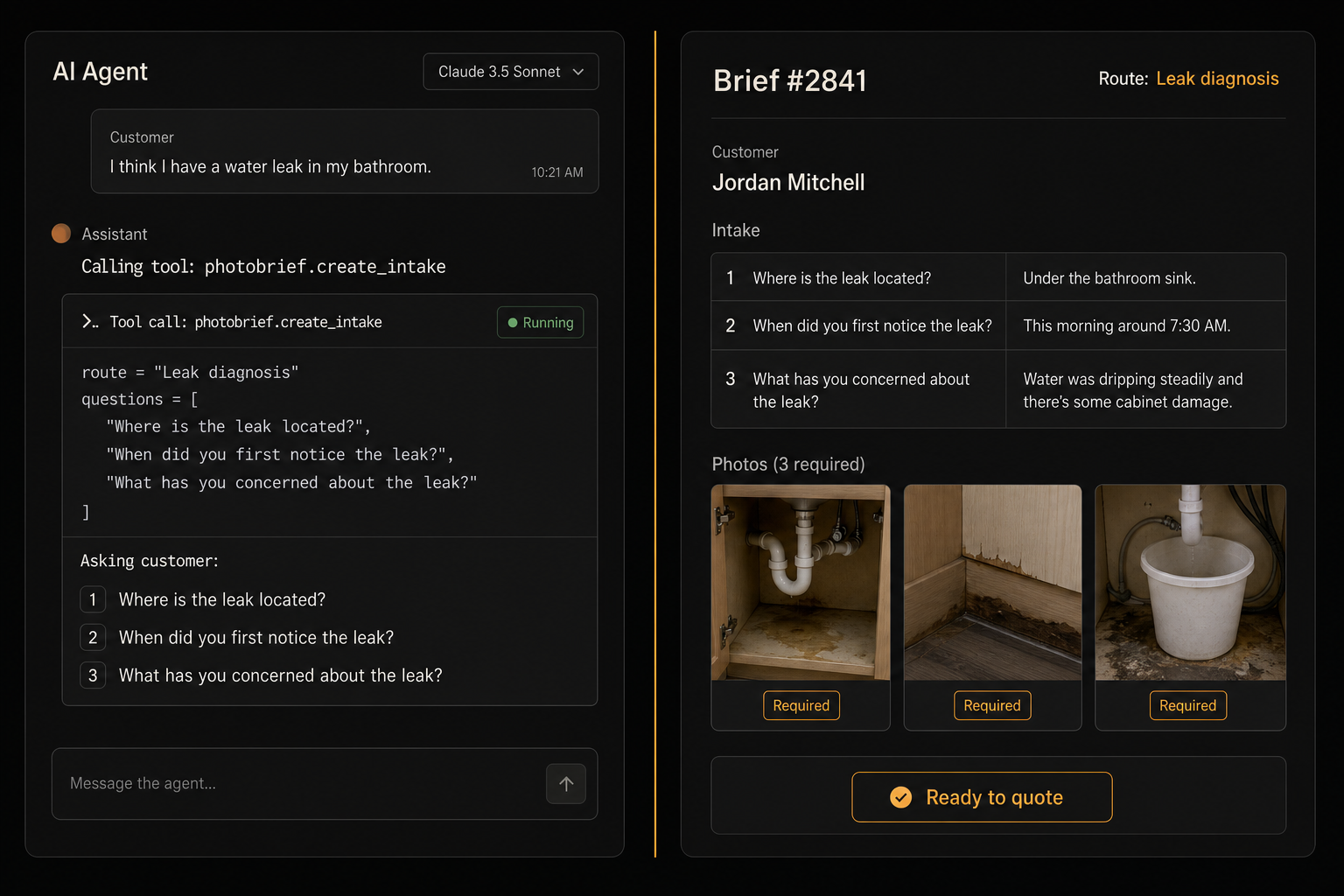
The same lead can also be pulled by an agent through MCP and turned into a quote draft in one move.
[ 04 ] MCP & Agent manifests
Plug PhotoBrief into your agent
PhotoBrief runs a live MCP server. Connect it from Claude Code, Cursor, Windsurf, or any MCP-capable tool.
[ // ]MCP endpoint — Streamable HTTP
# Endpoint
https://mcp.photobrief.ai/mcp

# Tools available
create_request   — Create a photo request (requires pb_ API key)
lookup_pricing   — Plans, prices, and credit model (no auth)
read_faq         — Canonical FAQ answers (no auth)

# Claude Code / Cursor / Windsurf config example
{
  "mcpServers": {
    "photobrief": {
      "url": "https://mcp.photobrief.ai/mcp"
    }
  }
}
[ MAN ]
agent.json
Capabilities, auth, and discovery URLs in one file.
GET https://photobrief.ai/.well-known/agent.json
[ MCP ]
mcp.json
Live MCP server descriptor with tools, transport, and auth details.
GET https://photobrief.ai/mcp.json
[ 05 ] Agentic payments
Pay per call with x402
AI agents without a pb_ API key can pay per-call using the x402 protocol. No billing setup, no subscription — just machine-to-machine payments.
Per-call pricing
create_request = $0.10 USD (1 credit). lookup_pricing and read_faq = free.
Network
Base Sepolia (testnet). Mainnet support coming soon.
How it works
Call without auth → get 402 + requirements → send X-Payment header → done.
[ // ]x402 payment flow
# 1. Get payment requirements
GET https://mcp.photobrief.ai/x402/requirements?tool=create_request

# 2. Pay and execute in one call
curl -X POST https://mcp.photobrief.ai/x402/pay \
  -H "Content-Type: application/json" \
  -H "X-Payment: eyJ0cmFuc2FjdGlvbiI6IjB4Li4uIiwicGF5ZXIiOiIweC4uLiJ9" \
  -d '{"recipient_name":"Jane","recipient_email":"jane@example.com"}'

# Or via MCP: pass x_payment parameter instead of api_key
{
  "mcpServers": {
    "photobrief": {
      "url": "https://mcp.photobrief.ai/mcp"
    }
  }
}
[ 06 ]Discovery
Every machine-readable endpoint
/llms.txtShort markdown brief for LLMs.
/llms-full.txtFull reference: features, FAQ, API.
/openapi.jsonOpenAPI 3.1 spec.
/.well-known/ai-plugin.jsonChatGPT plugin manifest.
/.well-known/agent.jsonAgent capabilities manifest.
/mcp.jsonMCP server descriptor (includes x402 config).
/x402/requirementsx402 payment requirements endpoint.
/sitemap.xmlSitemap.